
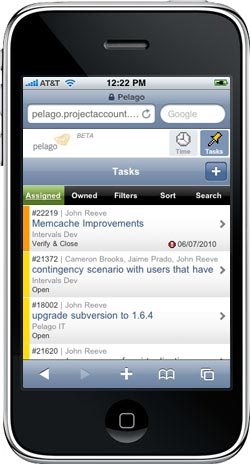
 Say hello to the new Intervals web-based mobile app, debuting in all its Beta glory on your smart phone’s web browser. Simply open your phone’s web browser and load your Intervals account, Intervals will take it from there. Whether at a meeting, in the field, or wherever your business may take you, easily track time and update tasks when your desktop or laptop is out of reach. The web-based mobile task manager app is a stripped down and simplified version of Intervals, perfectly suited for the small screen.
What does it do?
The Intervals web-based project management app gives you full control of your timers and tasks from the palm of your hand. Start, stop and apply timers while in meetings, on the road, or out in the field. Create, assign, and edit tasks at your convenience, without having to wait until you are in front of a desktop with an internet connection. More than just another excuse to work, increase productivity by keeping your Intervals data at your fingertips.
How does it work?
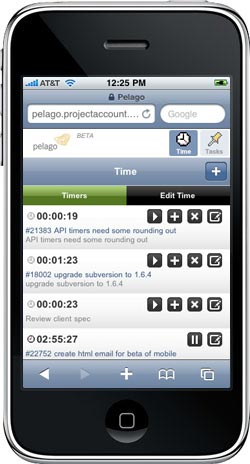 The Intervals web-based mobile task management app will work on most smart phones with a current web browser. Our project management app takes advantage of the latest Javascript, AJAX, and HTML5 technologies to create a fast and seamless experience. Load your Intervals URL into your phone’s web browser to get started.
The following phone OS and browser combinations will work with Intervals:
- iPhone + Safari
- Android + Native browser
- Blackberry + Native browser
- Windows Mobile + Opera
Please note, some browsers may have Javascript disabled by default and will need to have it enabled to work. A note on Opera Mini: Intervals will not work with the Opera Mini browser due to its limited support for Javascript.
What’s next?
Distilling a comprehensive app like Intervals down into a core set of mobile features is no easy feat. We’ve begun with the ability to access time and tasks, but we’re not stopping there. Future releases of the Intervals web-based mobile app are scheduled to include scaled down versions of clients, projects, milestones and people. With these upcoming additions you will be able to contact clients and team members, and update project and milestone deadlines directly from your phone.
What do you think?
Get out your phone and give the Intervals web-based mobile app a whirl. Let us know what you think, especially what how you’d like to see Intervals evolve on your smart phone. We want to keep our you in the loop while we build out more features for the web-based mobile app. Post your comments and let us know what you think!





Did this iPhone app ever go live? Is it still available in beta? Can we test it?
Thanks
Alistair Jackson
O’Brien & Company
Intervals is available now on a mobile device. Simply open up the Safari web browser on the iPhone and go to your Intervals URL. Intervals will load the mobile version automatically.
I understand why this is a mobile web, but I think native app for iPhone , Android would be a must have these days, check out your competitors…
Jack, thanks for the input. To read more about the design decisions behind our mobile app using HTML5 and CSS, take a look at these two blog posts:
Revisiting Web Design Decisions Behind the Intervals Mobile App
http://www.myintervals.com/blog/2011/03/08/revisiting-web-design-decisions-behind-the-intervals-mobile-ui/
Design Decisions: Basecamp mobile UI
http://37signals.com/svn/posts/2778-design-decisions-basecamp-mobile-ui
At this moment our native iPhone App ‘Intervals Time’ is currently waiting for review in the AppStore. Hopefully it will be in the Store soon. I’ll keep you posted.
In the first version we have implemented the basic things for adding, deleting and running Task and General Timers and viewing project and Task information.
We are working already on the next version and want to implement as much features as possible. As from the moment the App is released we are going to listen to the users of the App that will set the priority of the items to implement.
With this said, we are also working on a iPad version which can have more possibilities as it has more space to show information. Hope you’ll all like this new App so we can use the MyIntervals functionality in it’s full essence on your mobile device as well.
Iwan,
Thank you for sharing about the upcoming iPhone app you’ve developed. Please let us know when it is available in the app store so we can check it out.
Android app also would be appreciated.
Marco,
We do not have any plans at this time to release a native Android or iPhone app. However, there are some third-party developers who are pursuing developing native apps using the Intervals API. The Intervals team has decided to continue developing the Intervals mobile app as an HTML5 application that will work on just about any mobile device with a modern web browser.
To read more about why we are doing this, please see this blog post:
http://www.myintervals.com/blog/2011/03/08/revisiting-web-design-decisions-behind-the-intervals-mobile-ui/
## Mobile Apps for Android & iOS are available ##
More information about the Intervals Mobile App for Android & iOS is available here https://www.myintervals.com/apps/