
Please head to help.myintervals.com for help articles and guides. If you have any questions, please contact our support team.
-
- Michael
- Oct 31st 2008 edited @ 04/04/2016 12:36 pm
Each Intervals account comes with a work request queue. The queue fields work requests that can be reviewed and turned into tasks. All user levels within Intervals can submit work requests by navigating to Tasks >> Request queue. This method requires users to login and physically submit a task queue request. If you have clients submitting work requests it can be challenging getting them to login and submit a work request. This is where using the email request queue can be very useful.
If you navigate to Tasks >> Request queue there is an option on the left for the email queue: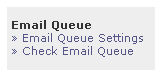
If you click on Email Queue Settings you can have Intervals check an email account on your behalf and jump start work requests via email. The Email Queue will check the email account that you have specified every 10 minutes and if there is a new request it creates a header alert and emails members of your team that you have selected to receive alerts of new requests.
Here is what the header alert looks like: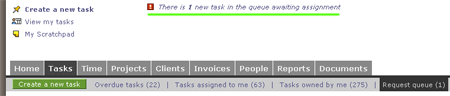
Here is a screenshot of he configuration page: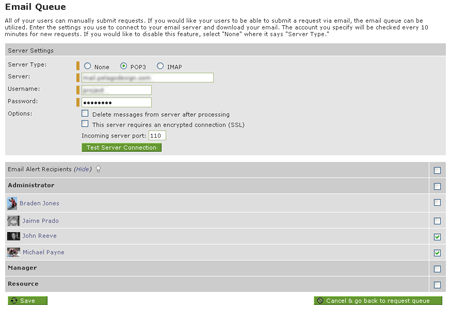
Attachments in the email will be attached to the request/task as documents. On the Pelago side of our business we have all of our maintenance customers submit requests to a special work request email. Instead of emailing their project manager directly they can email the request to this email address and any member of our team can assign the request to jump start it. It helps streamline the flow quite a bit and allows us to give a hi level of customer service. -
- Michael
- Oct 23rd 2009
Just a quick update that the email request queue now includes the ability to add a request to an existing task. This can be used to quickly add attachments and text from an email to an existing task and it can be pretty handy if your clients happen to email the queue frequently with new information on an existing task. -
- yourmanstan
- Nov 9th 2009
is this the beginning of two-way email integration? i just did a test comment, however the reply-to email still shows the staff email rather than the request queue email. -
- jreeve
- Nov 10th 2009
We do have plans to integrate two-way email integration, but it has not been built out yet. Stay tuned. -
- jnhearne
- Nov 18th 2009
How does one go about using an existing Exchange server without setting IMAP (such as Exchange 2003 which does not support IMAP) -
- Michael
- Nov 18th 2009
We are currently using an Exchange server for our mail and are utilizing the POP3 configuration to check the queue. -
- dkenzik
- Mar 2nd 2010
Is there a way to extract just the attachments from an email in the work queue and place it in a project's documentation area -- without creating a new task? -
- Michael
- Mar 4th 2010
The documents can be appended to an existing task or a new task can be created but unfortunately there is not a way to extract the documents from a work request and attach them directly to a project. -
- williamconifer
- Mar 22nd 2010
We are trying to find a way to create a process within our organization that can take advantage of Intervals as a support ticketing system. Because we are a full service agency, having one email for task que is a bit lacking. Right now we are dealing with web site support requests coming from our clients. I would really like to see having multiple email ques. job@, support@, quote@ etc... As you know support requests are very time sensitive and we need to get to them asap. I would rather NOT have that kind of request go to our traffic person.
BTW, I am really happy with the talk of 2 way, task related email. As a former Basecamp user, this is what I miss most. -
- james@dvns.com
- May 27th 2011
We tried using this functionality earlier but ended up sticking with email. The reason being we wanted to have the support staff manage the queue, but it turns out that you have to be an administrator to do that. We have support staff that manages issues coming in now via email and phone and we would prefer not to give them not only access to all our projects but administrator access to boot. Is that still the case, or is there a way to allow a non administrator see all requests and assign/create for projects they have access to? -
- Michael
- May 27th 2011
Presently you do not have to be an administrator to be granted access to the email queue. If you navigate to Tasks >> Request Queue >> Email Queue Settings >> Email Alert Recipients you can select which members of your team you would like to grant access to the email queue. -
- gatorit
- Jun 28th 2011
Really looking forward to the e-mail integration/hopper enhancements! -
- Michael
- Sep 13th 2011 edited @ 09/13/2011 5:08 pm
The Hopper and Email integration is currently in beta. More information is available here.
-
- outthere
- Nov 16th 2011
When submitting a request to the queue, how do I specify the client/project/priority/due date? That is where do I put it in my e-mail? -
- Michael
- Nov 19th 2011
There is not a way to specify the client, project, priority or due date when sending a request to the queue at this time. In an upcoming release of Intervals you will be able to specify the client and project. For example a request sent to request+124@yourdomain.intervalsonline.com will go to the queue with the client and project preselected. -
- Michael
- Feb 24th 2012
The Hopper/Email Request Queue has been updated and includes the ability to email a request directly to a project now. More information is available on our blog here.
-
- aleri
- Sep 25th 2012
I am struggling with the same issue as noted by WilliamConifer above. Our company is very interesting in migrating several support departments into TimeTask (currently only the Creative Department is using TimeTask). In order for our IS, Analytics and Operations departments to migrate to timetask, we need the ability to manage multiple queues. Having all requests and support tickets for all departments coming into 1 queue would be a nightmare to manage.
Are there any near future plans to incorporate the ability to have multiple email addresses to support multiple queues? -
- Michael
- Sep 25th 2012
We do not have plans to add multiple queues at this time but the functionality is being considered. Probably the closest current functionality is sending requests directly to individual projects. When a project is emailed directly only the people specified as the project managers for the project receive an email notification. Also, the queue can be filtered by client, project, sender, etc. Depending on your needs that might be an option. -
- bnitulescu
- Jan 15th 2013 edited @ 01/15/2013 3:04 am
We want to set up a workflow where the clients are Executive users and send requests to be converted into tasks. We want to have those requests processed either by the project manager or by another support employee - they are different from one project to another. Those users should be notified when new requests are coming on their project. Is there a way to do that in Intervals without giving the support employees Manager roles? -
- Michael
- Jan 15th 2013
They could be made into a queue attendant but then they would be notified for every request so that might not be workable. For requests that go to the queue with the project specified only the manager(s) for the project are notified. There is not a way to select certain people to be notified at this time.
1 to 20 of 20
Comments are closed.
For more Intervals help documentation, please visit help.myintervals.com