
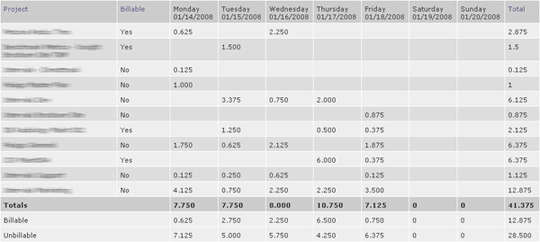
One of the great benefits to a weekly timesheet is that it offers a quantitative perspective of where your time is going. The timesheet helps you visualize how much time you are spending each day on each project, so you can identify which projects are using up too little, or too much, of your time.
The above image is my timesheet from last week. My Intervals weekly timesheet tells me i’ve worked on too many projects last week — six projects on every day except thursday. And I spent less than one hour that week on two of the projects. Now I realize why I felt frazzled at the end of the week; my workload was too fragmented. Knowing I work best on a minimal number of projects, I need to focus on fewer than four projects in one day.
Using my intervals timesheet to understand my time tracking helps me work better next week. It’s one of our philosophies at Pelago; predict, track, learn. Track your time, analyze the reports, and improve workflow.




