
Modification to Invoices based on actual work performed

November 9th, 2007 by Michael

With in there are two ways to create an invoice:

  1. Freeform
  2. Actual work performed

We recently improved the formatting when creating an invoice based on “actual work performed”.   When the calendar is selected days that have billable time for the project being invoiced will turn green:
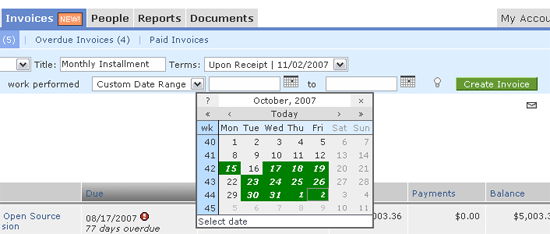
Invoicing in Intervals - actual work peformed

This improvement is meant to help make sure a day with billable work is not overlooked for clients that get invoiced sporadically.


Tags: ,

Related posts

Bookmark:
  • Post to Del.icio.us
  • Post to Digg
  • Post to Google
  • Post to Ma.gnolia
  • Post to MyWeb
  • Post to Newsvine
  • Post to Reddit
  • Post to Simpy
  • Post to Slashdot
  • Post to StumbleUpon
  • Post to Technorati

One Response to “Modification to Invoices based on actual work performed”

  1. Forum for Intervals :: Time and Task Management - Invoicing - how do I include detailed task information on an invoice? Says:

    Kramer auto Pingback[...] time period (Hint - If you use the calendar, dates where billable work occurred will turn green - here is an example in the blog).#3 and #4 are in direct conflict of one another and we have learned that the need often varies [...]

Leave a Reply

Contact / Newsletter Information


