Advanced editor with spell check added to emails

August 30th, 2007 by Michael

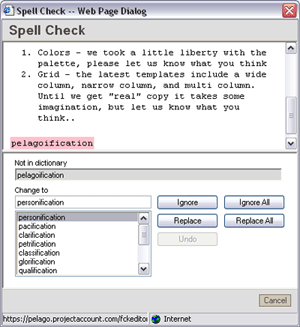
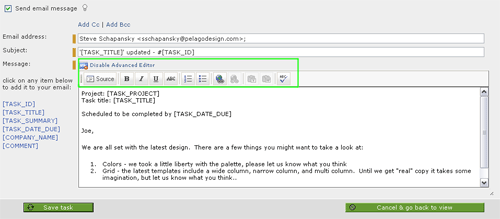
Today we launched a set of minor improvements and enhancements (more contextual cross linkage, a character encoding bug, etc.). Also, the advanced editor is available now when using the “send email message” functionality. The Advanced editor allows you to do bulleted lists, bold, italics, etc. It also features spell check which will save me one extra step. Whenever I email a update to one of our clients from within I copy and paste the email into a program with spell checking, then past it back. Adding the advanced editor removes this step.

Here is what the editor looks like on a task:
Advanced Editor

Here is the spell check:
Spell Check

Tags: , ,

Related posts

Bookmark:
  • Post to Del.icio.us
  • Post to Digg
  • Post to Google
  • Post to Ma.gnolia
  • Post to MyWeb
  • Post to Newsvine
  • Post to Reddit
  • Post to Simpy
  • Post to Slashdot
  • Post to StumbleUpon
  • Post to Technorati

One Response to “Advanced editor with spell check added to emails”

  1. Intervals Forum - Allow the ability to create tasks without assinging them to someone Says:

    Kramer auto Pingback[...] this for some of our projects and it works well for me to keep my thoughts in one place. I use the advanced editor to make a strikethrough any line item that has been turned into a [...]

Leave a Reply

Contact / Newsletter Information