Apply General Timer to a Task and Profile Photos

August 15th, 2007 by Michael

Today we are launching a few minor updates to (14 total). Two of them are directly in response to feedback from users:

1. Apply the General Timer to a Task

  • Tracking time on tasks is the ideal way of tracking time…especially for reporting. This improvement makes it a little bit easier.
  • When the general timer is applied all Open tasks for the project that is selected will show up in a drop down menu.
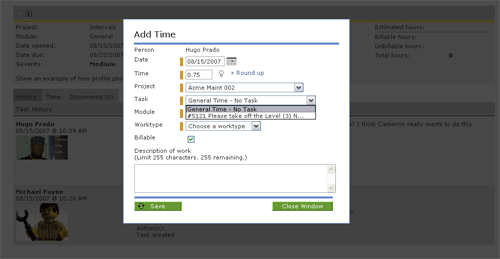
Apply Time

2. Profile Photos

  • Each user can upload a photo in their My Account section
  • Administrators can upload photos in the People section
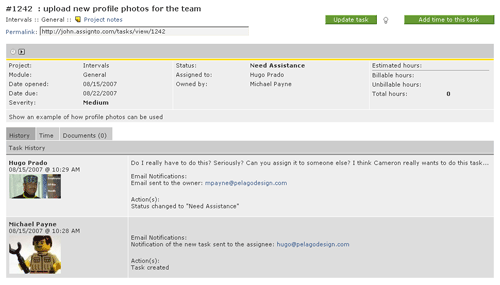
  • Photos are sprinkled through in a variety of places including task comments and the running timers page
  • Be serious and professional OR have fun with it

My Account
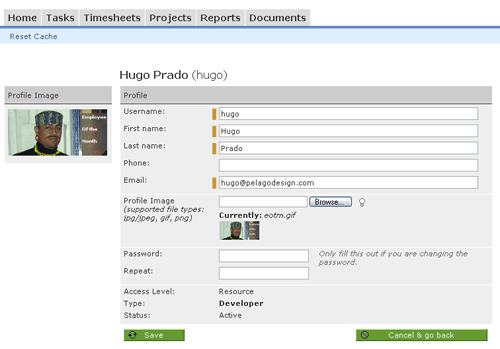
Profile Photos

Task Comments
Photos on Comments

Invoicing is the next significant feature that will be launching.  We are shooting to launch it in a few weeks…

Tags: , ,

Related posts

Bookmark:
  • Post to Del.icio.us
  • Post to Digg
  • Post to Google
  • Post to Ma.gnolia
  • Post to MyWeb
  • Post to Newsvine
  • Post to Reddit
  • Post to Simpy
  • Post to Slashdot
  • Post to StumbleUpon
  • Post to Technorati

2 Responses to “Apply General Timer to a Task and Profile Photos”

  1. Office 2.0 Database - Intervals Says:

    Kramer auto Pingback[...] 08/15/2007: Apply General Timer to a Task and Profile Photos [...]

  2. Intervals Forum - Add General Time to a Task Says:

    Kramer auto Pingback[...] days ago   The ability to apply time to a task from a general timer is live.. This feature has only been live 1/2 of today and I already don’t know why we didn’t add it [...]

Leave a Reply

Contact / Newsletter Information